Coach

Grow Your Business,
Own Your Time

Publish your profile, design packages on your own terms, manage your clients from one dashboard and see how your business is really doing with real data. Work on iPhone, Apple Watch and your computer with the same account; start using it the moment you sign up, with no approval process to wait for.

Screens from the App

Swipe to browse →

Real screens from the Pulikon coach app: today's plan, calendar, clients, packages, your profile and Apple Watch.
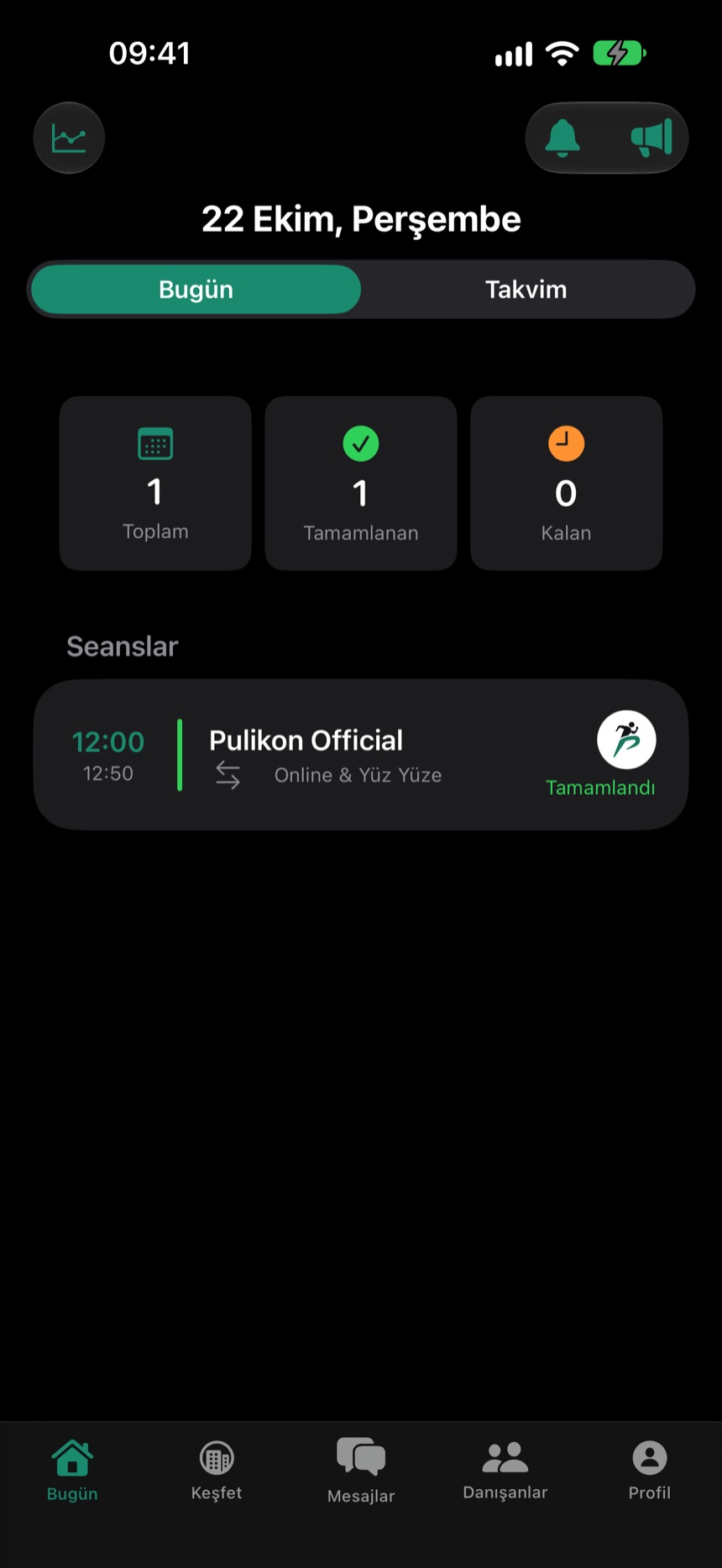
Today screen
Today
  • Today / Calendar — Switch between the daily list and the monthly calendar with one tap.
  • Today's summary — See your total, completed and remaining sessions instantly.
  • Sessions — See the day's sessions with their times; mark them Completed or No Show.
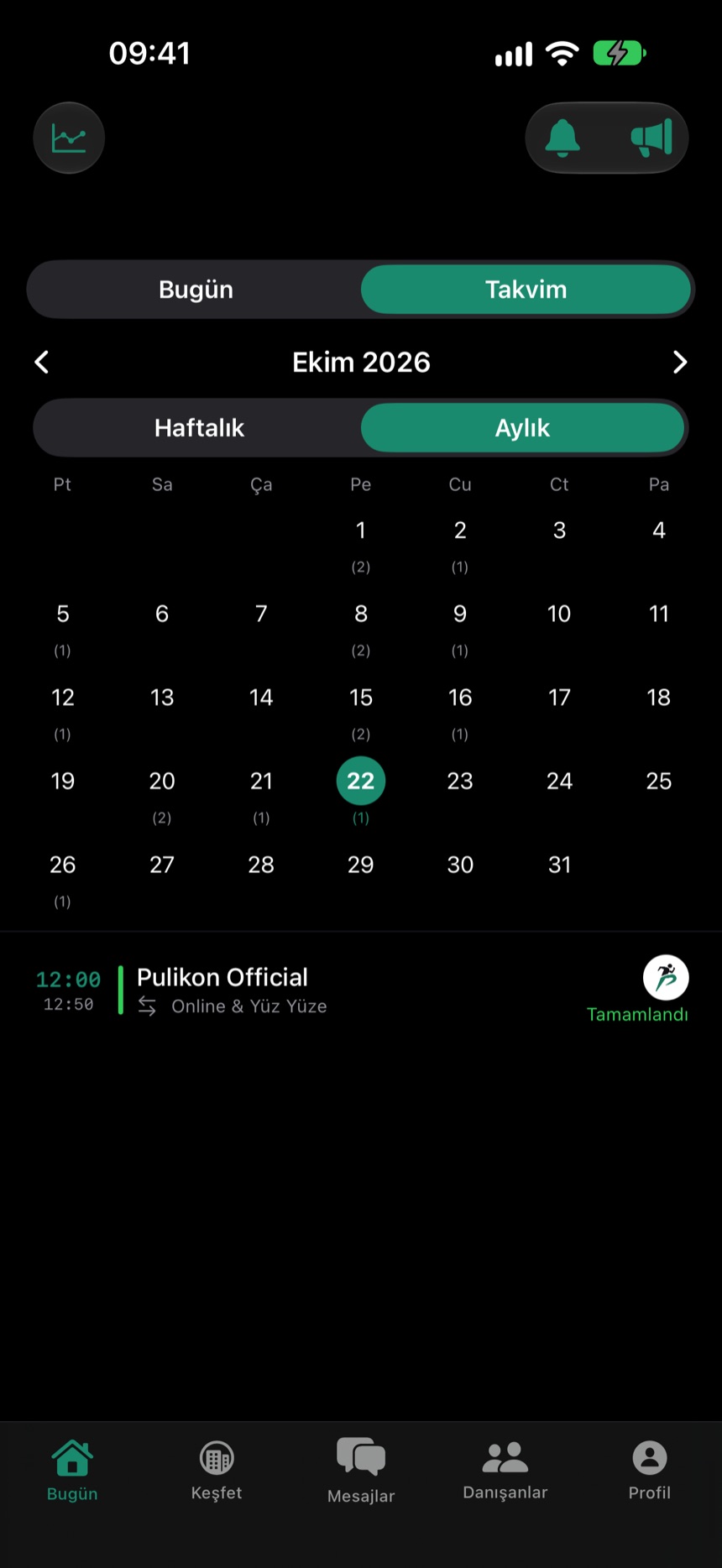
Calendar & Quick Actions screen
Calendar & Quick Actions
  • Monthly view — Each day shows that day's session count underneath.
  • Weekly / Monthly — Pick the view you like and swipe between months.
  • Quick actions — Tap a session: add a note, send a message, reschedule, or mark it Completed or No Show.
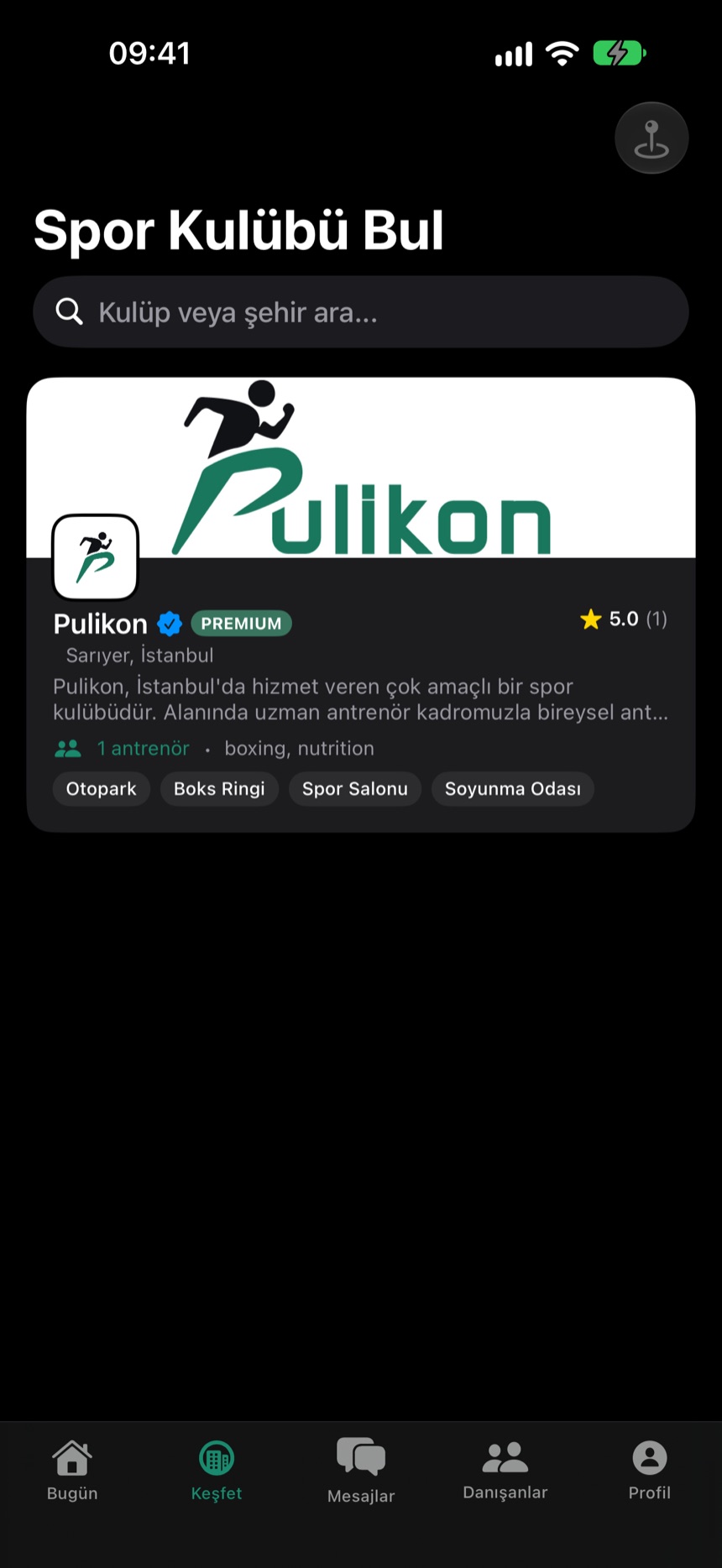
Find a Sports Club screen
Find a Sports Club
  • Search clubs — Search by club name or city and find the one that suits you.
  • Club card — Rating, location, coach count and sports on one card.
  • Facilities — Parking, boxing ring, locker room… see what the club offers before you go.
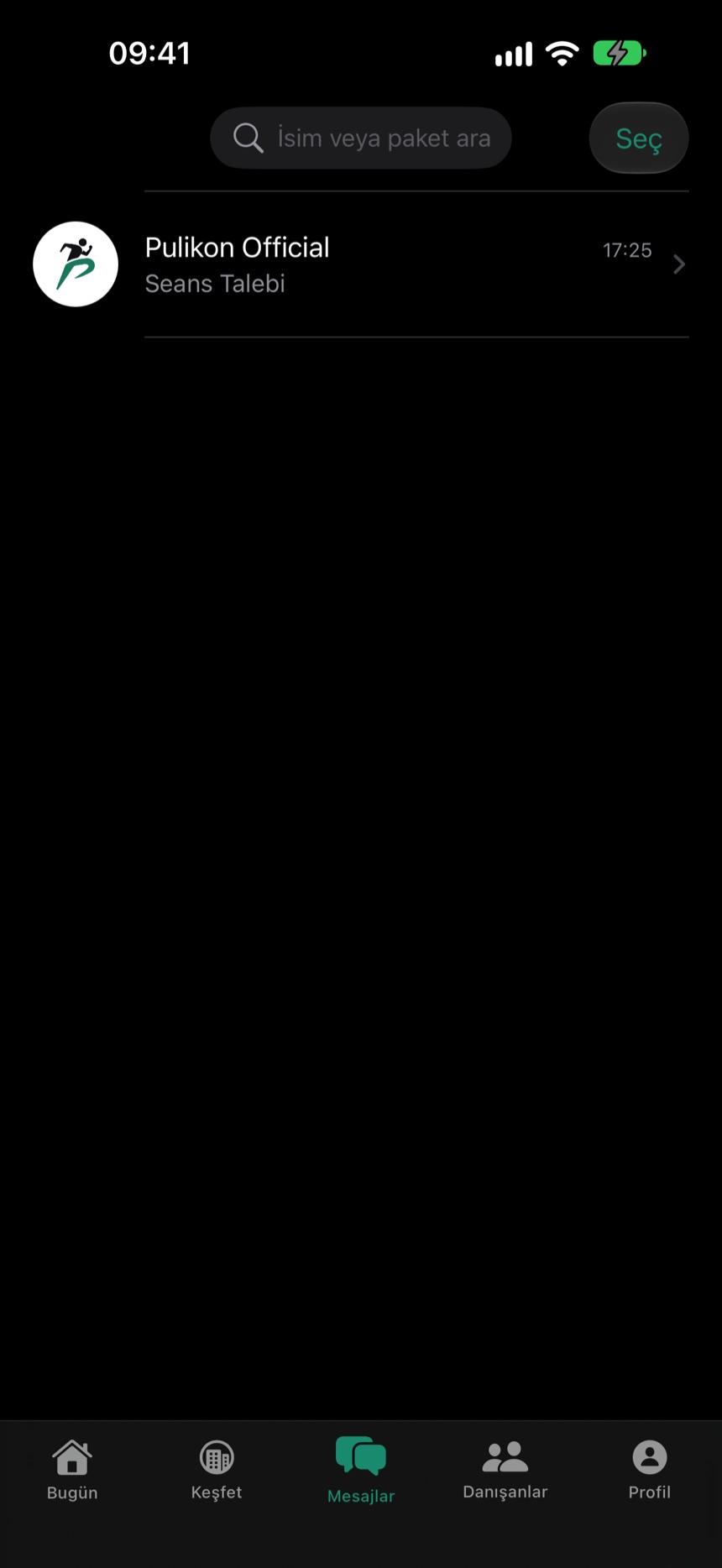
Messages screen
Messages
  • Search and select — Search by name or package, select chats in bulk.
  • Chats — Message all your clients; the last message and its time appear in the list.
  • Session requests — The times your client wants arrive as a card in the chat; adjust them and approve with one tap.
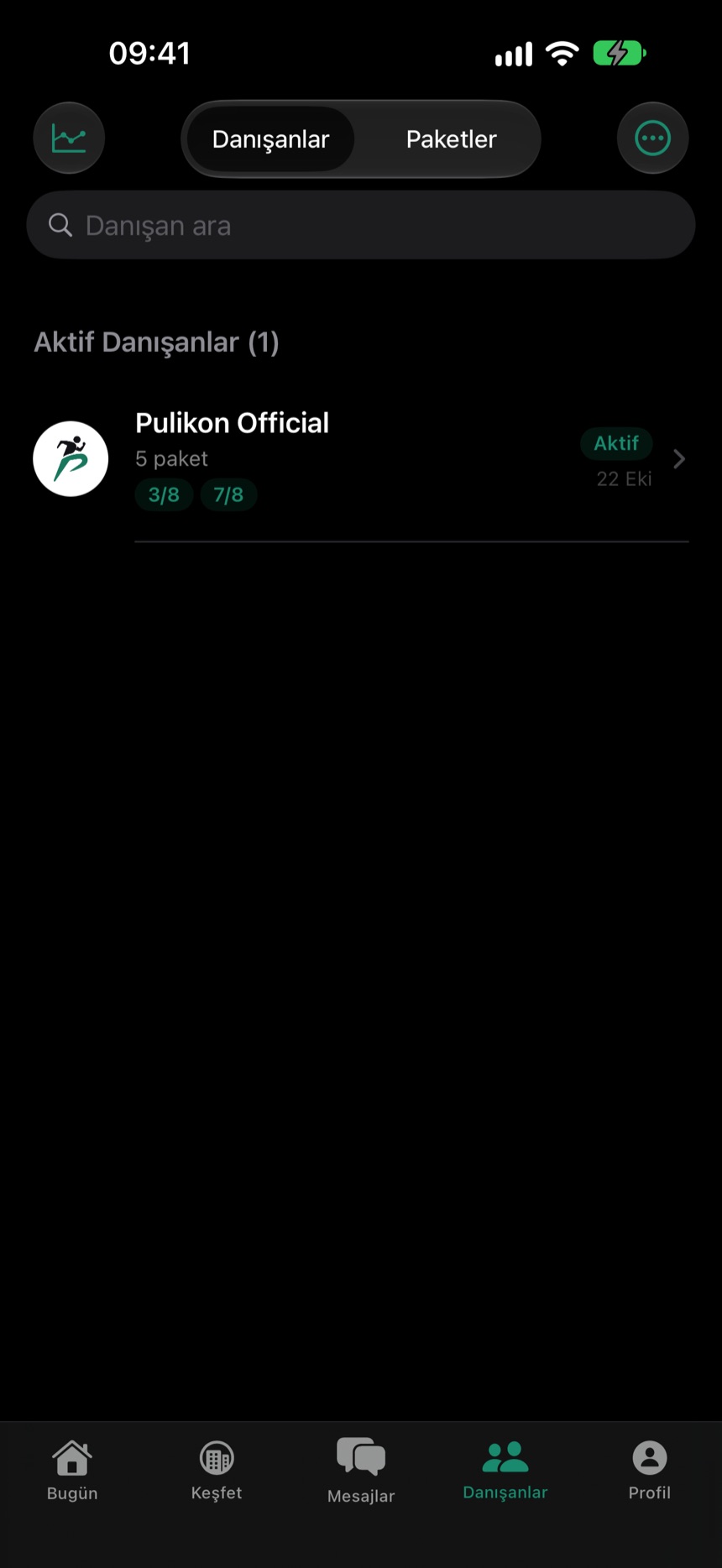
Clients screen
Clients
  • Clients / Packages — Switch between your client list and package templates.
  • Package status — Each client's active packages and used sessions.
  • Client profile — Tap a client: packages, payments, sessions and notes on one page.
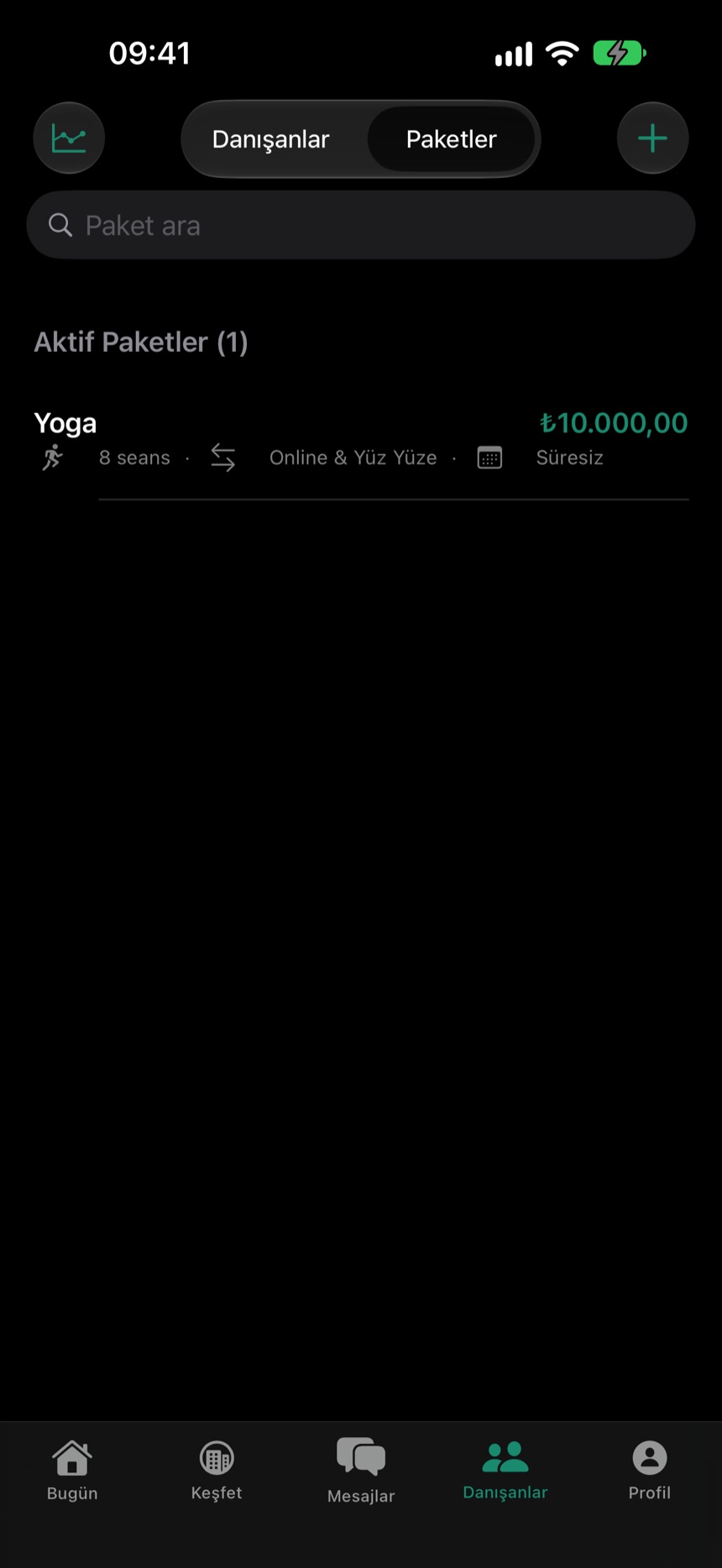
Packages screen
Packages
  • New package — Tap + to create a new package template.
  • Package details — Number of sessions, lesson type, price and validity period.
  • Assign package — Assign a package to your client from the chat or via connection code — it starts once they approve.
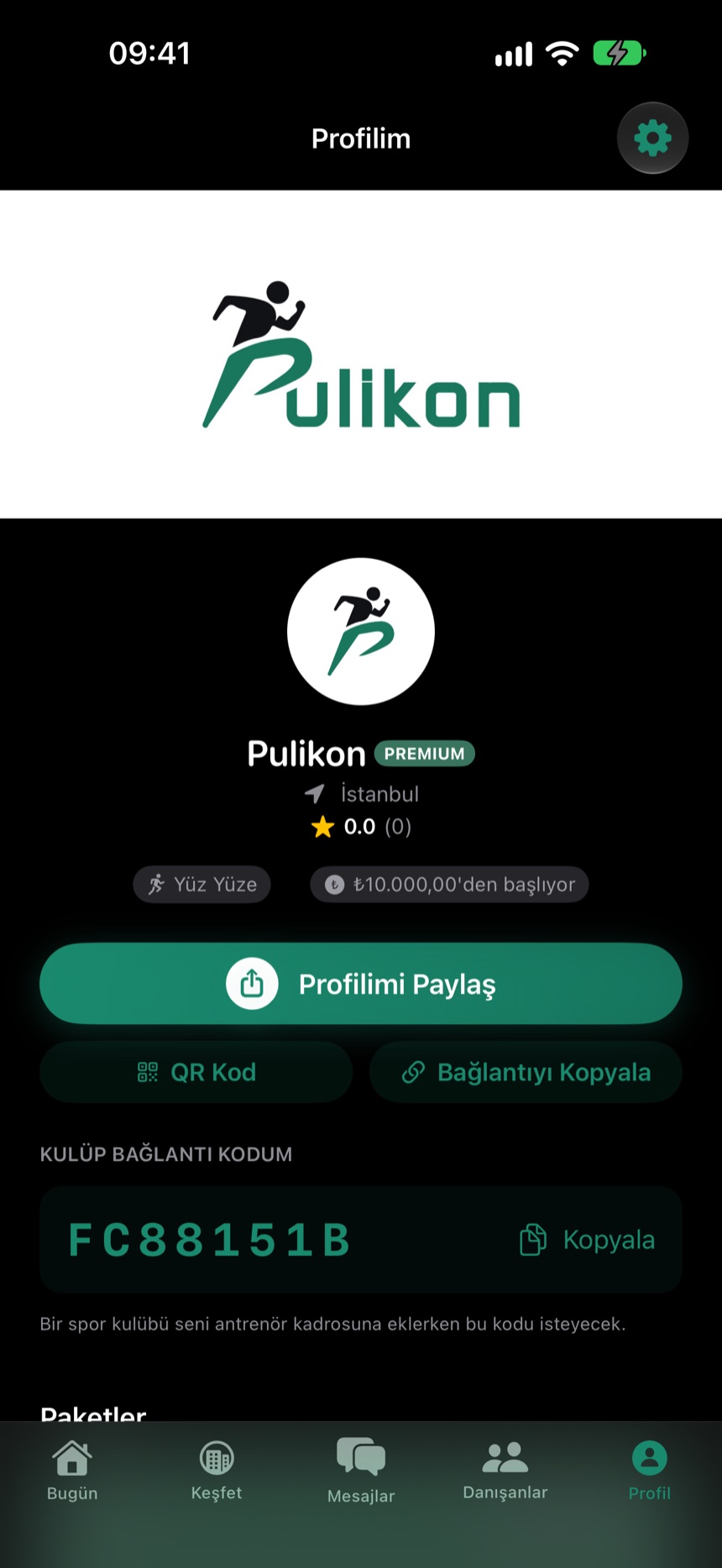
My Profile screen
My Profile
  • Your profile card — Your photo, rating, lesson type and starting price.
  • Share your profile — Share via link or QR code so clients can find you instantly.
  • Your connection code — Clubs add you to their team with this code — with your approval.
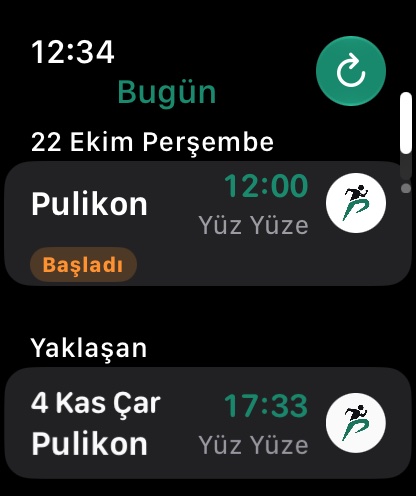
Apple Watch screen
Apple Watch
  • Today — The day's sessions on your wrist, with time and lesson type.
  • Live status — When the session starts, the card says “Started”.
  • Upcoming — Your next sessions are listed too; no need to check your phone.
1

Professional Profile

Video & Photo Gallery
Present yourself at your best with a cover photo, intro video and photos of where you train.
Real Available HoursNEW
Your profile shows the truly free slots for the next 7 days; fully booked days say “Full”. A client can never pick a past or taken slot.
Weekly Working Hours
Set different time ranges for each day and your default session length. If you're linked to a club, the club can open your working hours too.
Busy HoursNEW
Got a private appointment or a lesson elsewhere? Mark that slot as busy; clients see those hours as taken, so there are no clashes.
Blue Check & CertificatesNEW
Upload your certificate for each sport you choose; once our team reviews and approves it, a blue check appears on your profile. You can send documents during sign-up or later from your profile.
Discover & Shareable Profile
Clients find you by city, district, sport, price and session type. Share your profile link on Instagram; even someone who hasn't signed up for the app yet can see your profile, packages and free slots.
Social Links
Add your Instagram and website links to your profile so clients can find you everywhere.
2

Package Design

Fully Customizable
You set the number of sessions, their length (any number of minutes you like — 40, 45, 51 or 60) and the price.
Your Own Cancellation Policy
Set a separate rescheduling/cancellation window (in hours) for each package, plus a rule for automatic deduction or notifying you.
Extra Services
Include extra services like nutrition coaching or physiotherapy in your package.
Active / Inactive Management
Deactivate a package you no longer want to sell without removing it from the list.
3

Client Management

Clients Without the AppNEW
Your client doesn't want to download the app? Add them with name and phone (with KVKK consent) and manage their package and sessions yourself. If they want, they can link to their own account with an 8-digit invite code, and their full history carries over unchanged.
Add via Connection Code & QR
Add a client you already work with via connection code or QR. You're connected once they approve; nobody is added to a list without their consent.
Pick Up Where They Left Off
Assign their package with the number of sessions they've already completed, and schedule the dates and times of the remaining lessons.
Schedule Sessions: One Lesson or All of ThemNEW
From the package card on the client's profile, schedule unplanned sessions one by one or all at once: pick the day and time pattern, edit the rows, and create them all together.
Bulk History Import
Bulk-import your pre-app records with the Excel template or by hand, and get automatic match suggestions by phone number.
Client & Session Notes
Keep private notes on every client and every session that only you can see (Premium).
Payment Tracking & Reminders
Track each package's paid / unpaid status; send a reminder to a client with a pending payment in one tap.
Client PDF Report
Get a client's details, packages and session history as a PDF report with one tap, and share or print it.
4

Calendar & Operations

List, Month & Day View
Track all your sessions in the view you like; mark them completed / no show / canceled with one tap.
Unmarked SessionsNEW
Past lessons that haven't been marked show up as an alert; select them all and mark them “Completed” or “No Show” in one go.
One-Tap Request ApprovalNEW
A single lesson or a full session request your client picks from your free slots arrives as editable rows; approve them all with one tap. Accept or decline rescheduling and cancellation requests here too.
Fair Session Deduction
A lesson is deducted from the package only when it's marked “Completed” or “No Show”. If you decline a rescheduling request, nothing is deducted and the lesson stays at its original time.
Pending Requests
See new contact requests in a separate list; review the details, accept, and build the program together.
Automatic Reminders
Clients are warned automatically before their rescheduling/cancellation window runs out. Their rights are protected without you lifting a finger.
5

With You Everywhere

Apple Watch AppNEW
Today's lessons, your calendar and your clients on your wrist. Reschedule or cancel a lesson, or message a client, right from your watch; no need to take out your phone.
Live Lesson on the Lock ScreenNEW
When the lesson starts, a live card opens on the iPhone lock screen; when it ends, mark it “Completed” or “No Show” right from the lock screen.
Home Screen WidgetsNEW
See your next lesson without unlocking your phone; from the widget, jump to the lesson, reschedule or send a message with one tap.
Full Dashboard on Desktop
With app.pulikon.com, get tables, bulk actions, Excel import and printable reports on your computer. Same account, same data as the app.
7 Languages
Turkish, English, German, French, Spanish, Italian and Arabic. Notifications reach your international clients in their own language.
6

Analytics & Income

Real Income Tracking
See your real weekly, monthly and yearly income, completed session count and completion rate on one screen.
Active Clients & Package Breakdown
See how many active clients you have and how many people bought each package.
Expense Tracking
Enter expenses like rent and equipment; see your income, expenses and net profit period by period.
PDF Analytics Report
Automatically generate a report comparing income, expenses, net, packages sold and new clients with the previous period, and download it as a PDF.
Ratings
Ratings and reviews come only from clients who completed their package; see them all on your profile.
7

Extra Tools

Store
Showcase products like supplements and equipment in the store on your profile.
Nutrition Program
Create and track weekly nutrition programs for your clients.
Belt Tracking
Track your clients' belts and grades in combat sports like kickboxing and Muay Thai.
8

Contact

One-on-One Messaging
Message your clients instantly in the app; lesson and package cards right inside the chat.
Group Chat
Create groups with your clients from the chat screen.
Bulk Announcements
Send an announcement to every client on a package at once.
Instant Notifications
New requests, lesson reminders and changes reach your phone and watch instantly.
9

Plans

BASIC
Free
Everything you need to get started
  • Profile, packages and visibility in Discover
  • Calendar, requests and messaging
  • Up to 5 clients
  • No hours of your own (if you're linked to a club, the club opens your hours)
  • No analytics, expense tracking, notes, store or tools
PREMIUM
₺499.99 / month
Save ₺999.89 a year with the yearly plan
₺4,999.99 / year
Works out to ₺416.67 a month · save ₺999.89 a year
  • Unlimited clients
  • Open your own available hours and let clients book sessions from the calendar
  • Income & session analytics, PDF reports
  • Expense tracking and income/expense analysis
  • Client and session notes
  • Store and tools (nutrition program, belt tracking)

Premium is purchased in the iPhone app as an App Store subscription and also works on the web with the same account. You can cancel anytime under App Store > Subscriptions.

Pulikon gets better every day, and you decide what comes next

We build Pulikon by talking with coaches and clubs; new features are prioritized based on our users' requests. Something missing? Write to us from “Contact Us” in the app or the support page; as the two co-founders, we read your messages ourselves. The Android app is on Google Play; on a computer you can use app.pulikon.com.

Ready to Bring Your
Business to Pulikon?

Download the app or sign up as a coach on the web — publish your profile without waiting for any approval.